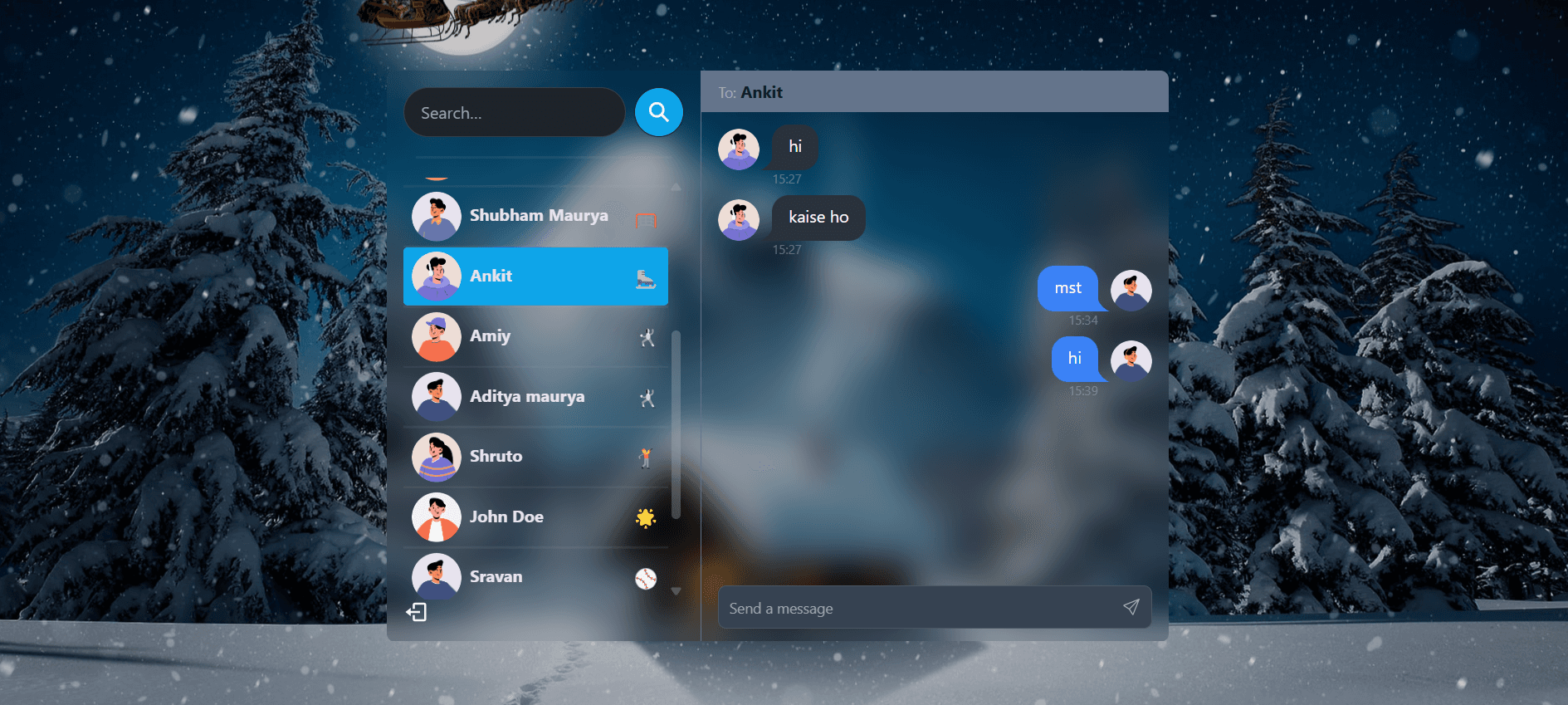
"Real-time connections. Real-world requirements."
The Chat App is a full-stack real-time communication platform built to handle instant messaging, user authentication, and online status tracking. Powered by WebSockets, it provides a seamless and instant chatting experience.
Problem Statement
"HTTP isn't built for conversations."
Standard web applications operate on a request-response model: the user asks for data, the server provides it. But conversations don't work like that.
When a user receives a message, they need to see it instantly—without refreshing the page or manually asking the server for updates.
The challenge was clear:
How do you keep a continuous, open connection between a client and a server?
How do you instantly push updates to specific users in real-time?
The Challenge
- ⚡ Real-Time Data — Moving away from traditional REST APIs and implementing WebSockets for instant, bidirectional communication.
- 🔄 State Synchronization — Keeping the UI updated in real-time when new messages arrive or when a user's online status changes.
- 🔐 Secure Messaging — Ensuring that only authenticated users can connect to the chat server and access conversation history.
- 🏗️ Event-Driven Architecture — Learning how to handle continuous event listeners without causing memory leaks or duplicate messages.
The Solution
"Meet Chat App — Instant, reliable, and secure communication."
To solve the real-time problem, I built a robust event-driven architecture using Socket.io.
Connect → Authenticate → Listen → Broadcast
- Instant Messaging — Messages are delivered and rendered in milliseconds, creating a frictionless conversational experience.
- WebSocket Integration — A persistent, bidirectional connection ensures the server can push updates to clients instantly.
- User Authentication — Secure login and registration flows to keep conversations private.
- Online Presence — Real-time tracking of when users join or leave the platform.
- Persistent Storage — Chat history is reliably saved to the database, ensuring no messages are lost when users disconnect.
Chat App bridges the gap between traditional REST APIs and real-time web technologies.
Technology Stack
"A modern event-driven architecture"
Frontend:
React.js manages the complex real-time UI state, ensuring that incoming messages instantly trigger localized re-renders without disrupting the user's experience.
Backend:
Node.js + Express.js serves the core API and handles the heavy lifting of the Socket.io server, managing active connections and broadcasting events.
Database:
MongoDB provides flexible and fast storage for user profiles and the high volume of chat message logs.
Real-Time Engine:
Socket.io enables the critical WebSocket connections, providing reliable fallback mechanisms and simple event-based broadcasting.
A scalable real-time architecture built to keep conversations flowing.
Deployment & Infrastructure
"Keeping the connection alive"
Frontend — Render
The client-side application is hosted for fast delivery, maintaining a persistent connection to the backend.
Backend — Render
The Node.js and WebSocket server is deployed on Render, configured to keep long-polling and WebSocket connections open and stable.
A deployment setup optimized for persistent, real-time networking.
The Chat App Story
"The project born out of absolute necessity."
This project wasn't just built for fun—it was built out of necessity.
I was working as an intern at a company, and I was assigned a massive task: Implement a real-time chat feature into the company's main website.
Up until that point, almost everything I had built was based on REST APIs. You click a button, you wait, you get data.
But a chat app? That required a completely different mental model. I couldn't just have the client ping the server every second to check for new messages—that would destroy the server's performance.
I realized I couldn't just jump into the company's massive codebase and start experimenting with technology I didn't fully understand.
If I was going to do this for the company, I needed to learn how to do it right first.
🔌 CHAPTER 01 — BREAKING THE RULES OF HTTP
"Discovering the magic of WebSockets."
I set out to build a standalone chat application from scratch.
The first hurdle was fundamentally changing how I thought about client-server communication. I discovered Socket.io and WebSockets.
Instead of opening a connection, sending data, and closing it, WebSockets keep the door open.
When I wrote my first socket.emit() and saw the message instantly appear on a completely different browser window without refreshing... it felt like magic.
🌪️ CHAPTER 02 — THE EVENT STORM
"Managing a chaotic flow of data."
While making one message appear was easy, managing an entire chat application was chaotic.
In a normal app, data flows linearly. In a chat app, data comes from everywhere, all the time.
I had to learn how to manage event listeners in React. At first, my app would render a single message three times because I accidentally created multiple WebSocket listeners!
I had to dive deep into React's useEffect cleanup functions to ensure that listeners were properly attached and detached, keeping the app fast and preventing memory leaks.
🗄️ CHAPTER 03 — DON'T LOSE THE CONVERSATION
"Connecting sockets to the database."
A chat app isn't just about real-time events. What happens when the user goes offline and comes back?
I had to build a bridge between my real-time Socket server and my MongoDB database. Every time an event fired, it didn't just broadcast to the other user—it had to securely and instantly save to the database.
Combining the persistent storage of MongoDB with the lightning-fast delivery of WebSockets taught me how modern full-stack applications handle complex data flows.
🚀 CHAPTER 04 — BRINGING IT TO THE COMPANY
"From sandbox to production."
By the time I finished the standalone Chat App, I had completely mastered the concepts of WebSockets, event-driven architecture, and real-time state synchronization.
I took everything I learned from this "practice" project and went back to my internship.
When I finally integrated the chat feature into the company's actual website, it worked flawlessly. I didn't have to guess or struggle—I had already built the blueprint.
The project that proved the best way to learn is to build it yourself.